USB
USB PWNY Express – Counterfeit USB Device AntiForensics
Triplet Unicorn Pwnys. We made them identical in every way, including their Serial Number.
“The truth is rarely pure and never simple.”
~ Oscar Wilde, The Importance of Being Earnest
Myths and Legends:
This past week, I spoke at the eleventh SANS DF/IR Summit (and oh, what a great summit it was!) about “Ground Truth” in digital forensics. My topic was about those things we take for granted – hardware, firmware, and the “truths” we are taught about imaging and forensic artifacts versus the more-complex realities I have come to realize after working side-by-side with a great data recovery company. Normally, I try to do a recap of the SANS summit, and this year’s summit had excellent content! But, this year I got more than a little bit side-tracked by some really cool “hallway-con shenanigans.”
In saying this, I am NOT telling you that I was goofing off. Quite the contrary. But it is accurate to say I was horsing around a little.
Before the summit, my good friends Matt Linton (Chaos Specialist for Google) and Ryan Pittman (Resident Agent in Charge, Computer Crimes Division, NASA OIG) asked if I would be on standby to assist with their tabletop exercise during the summit. Of course, I agreed. Matt put together his “Evidence USB” for the tabletop exercise. He then produced 10 copies of the data to pass out to participants on ten legendary Unicorn USB thumb drives.
As he was creating the devices, Matt messaged Ryan and me commenting that the USB devices seemed “shady” because they presented to the Windows OS with the following information:
This is just the sort of mystical and mythical information about firmware and hardware my summit talk was focused on! Convergence of topics is almost never a bad thing, and in this case it started a great conversation and led to some very cool collaborative testing.
USB Hardware and Firmware Mayhem:
USB thumb drives may look alike at the surface, especially with their outer coverings intact. But if you take a closer look at their hardware, you can find all sorts of very strange inner parts. The data recovery side of Gillware sees this all the time.
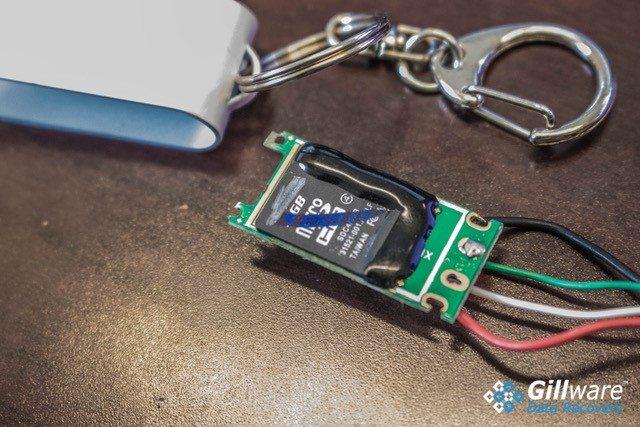
Yup. That’s a thumb drive… made out of a Micro SD card.
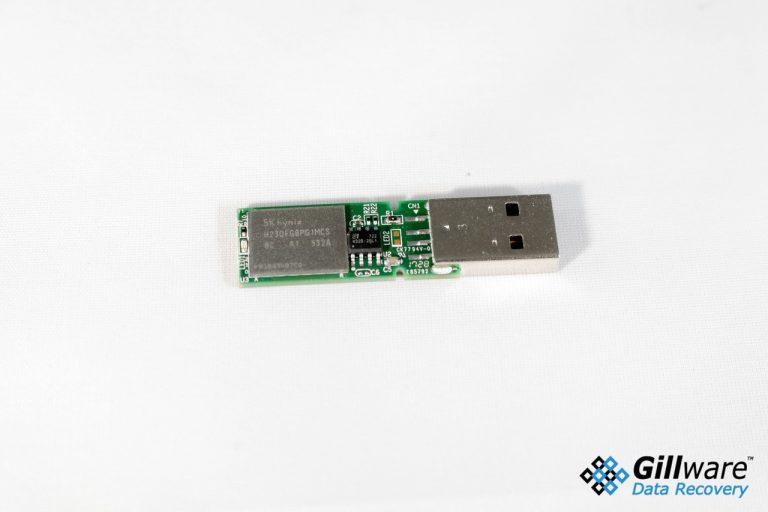
We’ve seen Micro-SD cards pasted to thumb drive boards, iPhone memory chips used inside brand name thumb drives, and different combinations of memory storage chips and processors used within the same manufacturer lots of devices. While at the surface the devices look the same, what’s under the covers may be completely different. Many USB thumb drives are literally made up out of mixed up parts hardware-wise.
Once the hardware is put together, the manufacturer flashes the firmware of the device in order to provide the USB device with its identity. There are firmware flashers for all of the various brands of controllers, and they’re fairly easy to find and download. Counterfeiting a USB device to replicate a more expensive brand name or to falsify the size of the device is all too common. Again, the data recovery side of Gillware sees this all the time.
Someone buys a 128 GB thumb drive on E-Bay for an unbelievably good price only to discover that while the reported size of the device is that large, the actual size of the device is much smaller. The ultimate result is data loss. Not only did the seller lie to them, the firmware was programmed to lie to their computer’s operating system about the size of the drive.
Here’s a thumb drive with a memory storage chip more commonly seen in an iPhone.
So What Does This Have to do with Forensics?
So, it’s clear that thumb drives aren’t always as they’re advertised. In our pre-summit chat, I let Matt know that we could manipulate the “unique” unicorn thumb drives to be whatever he wanted them to be by flashing their firmware. Matt and Ryan wanted to try this, of course, and so Matt sent me pictures of the internal components of one of the unicorns, and I sent him a link to the appropriate firmware flasher. Once at the summit, we pooled our brains, and along with Adam Nichols, Security Engineer for Google we went to work on Matt’s herd of ten “evidence” unicorns.
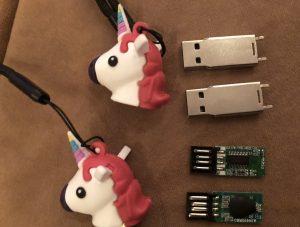
While the outsides of the unicorns look the same, the insides sure don’t.
Right away we found that while all of the unicorns looked the same on the outside, they were different animals internally. Of the first handful of Unicorns we pulled apart, we found two different combinations of controllers and memory storage chips. After several exploratory surgeries, we settled on three Unicorns for further testing. We named them Howard, Fargo, and Fillmore.
These three ponies (or pwnies, if you will) had the same brand of controller. Using the flashing software, we changed the identifiers in the firmware so that the USB drive manufacturer was listed as “Bad Product”, the serial number was “1BADHORSE”, and the volume name was “BADHORSE”. (Yes, Doctor Horrible Singalong Blog fans, this was an intended nod.)
Registry Comparison, Pwny Express:
We flashed Howard, Fargo, and Fillmore with exactly the same information, and then did some testing to see what registry artifacts they would leave behind. Would Windows see the USB devices as unique? Could we plug in multiple USB thumb drives with the same serial number into the same machine at the same time without a blue screen? Would they be assigned a unique GUID so that we could theoretically identify the activity of each USB drive in a hypothetical forensic examination? After all, forensic artifacts never lie, right?
Matt Linton, Cindy Murphy, and Adam Nichols playing My Little Pwnys, digital forensics edition.
Then, using the SANS SIFT Workstation, we did the following:
And… there were no differences between the three devices in the Windows Registry.
Filmore, Fargo, and Howard: A Side by Side comparison of registry differences.
“Unique” Windows Container IDs:
The Windows Operating System assigns “unique” container ID to an inserted USB Device based based upon a hash of the USB serial number of the device, or a randomly generated value if the USB device has no serial number. According to their documentation, Windows bases assignment of the container ID on information that is contained in the device. If the information on the device is altered via a firmware flash, Windows still trusts what it reads. It will produce the exact same container ID for USB devices that have the same serial number identifiers.
The ramifications here are clear: It is indeed possible for multiple USB devices to leave behind forensic artifacts that appear to be generated by a single unique device. Associated forensic artifacts such as link files, shell bags, and USB related registry values can’t know the difference because the firmware in the attached device is lying to them.
Matt, Ryan, Adam, and I are not the first to discover firmware manipulation. And, firmware manipulation can be used not only to fraudulently change the reported size of a device, or as an anti forensics technique to cover up data exfiltration, but also for malware attacks such as BadUSB. We will continue researching firmware manipulation and it’s various ramifications to the forensic artifacts we all rely upon, and you may see us speaking about this topic next year at the SANS Summit. In the mean time, keep your mind open for the various explanations that might lead to the artifacts your tools report to you. In other words, trust, but verify.